





Laser engraver software plays a crucial role in controlling and managing how a laser machine engraves, cuts, or etches different materials. Whether you are a hobbyist, DIY creator, small business owner, or industrial user, laser engraver software determines your workflow quality, engraving accuracy, speed, and the final output of your designs.
In this comprehensive guide, we dive deep into everything you need to know about laser engraver software—from its core features to advanced tools, common challenges, best programs available today, and expert tips to choose the perfect system for your engraving needs.
What Is Laser Engraver Software?
Laser engraver software is a digital platform that converts your designs—images, text, vector outlines, logos, patterns, and drawings—into laser-readable instructions. These instructions control how the laser machine engraves or cuts materials such as:
Wood
Acrylic
Leather
Metal
Fabric
Glass
Stone
Plastics
Cardboard and more
The primary role of laser engraver software is to translate creative ideas into precise laser movements through G-code or similar machine instructions.
Why Laser Engraver Software Matters
Without good laser engraver software, even the best laser machine cannot deliver clean, accurate, and consistent results. The quality of the software determines:
The resolution of engraving
Cutting smoothness
Material optimization
Speed and power settings
Design flexibility
Workflow efficiency
Level of automation
User experience
This is why professionals, designers, and laser businesses rely heavily on powerful laser engraver software for every project.
Key Features of Laser Engraver Software
Below are the essential features you should expect in modern laser engraver software.
Intuitive User Interface (UI)
A user-friendly interface ensures even beginners can perform engraving tasks without confusion. Good software includes:
Clean layout
Drag-and-drop design tools
Live project preview
Easy navigation
Advanced Vector Editing
Laser engraving requires precision. Therefore, vectors must be perfectly optimized. Quality laser engraver software includes:
Node editing
Path joining
Auto-smoothing
SVG import
DXF compatibility
Curve adjustments
Raster Image Processing
For engraving photographs, logos, and shaded artwork, raster editing tools include:
Dithering
Grayscale conversion
Brightness & contrast adjustment
Image sharpening
Noise reduction
Material Presets
Professional laser engraver software comes with preconfigured settings for specific materials, such as:
Power levels
Speed
DPI/PPI
Number of passes
This helps create consistent quality across projects.
Real-Time Preview Mode
Before sending a job to the laser, previewing the engraving path prevents errors. High-end systems include:
Simulated burn paths
Cut sequence visualization
Boundary preview
Estimated time calculation
Multi-Layer Management
Layers allow users to separate cutting, marking, and engraving tasks. This ensures:
Higher precision
Organized workflow
Improved material safety
G-Code Generation
G-code is the universal language of CNC and laser machines. Good laser engraver software outputs clean, optimized G-code for:
Smooth motion
Efficient engraving
Minimized overheating
Accurate paths
Device Compatibility
Supporting a wide range of laser machines ensures greater flexibility. Leading laser engraver software supports:
CO₂ lasers
Diode lasers
Fiber lasers
DIY/desktop engravers
Hobby CNC cutters
Types of Laser Engraver Software
There are three main categories:
Design-Based Software
These tools focus on creating artwork:
Examples:
Adobe Illustrator
CorelDRAW
Inkscape
They require exporting designs to separate machine-control software.
Machine-Control Software
These programs send commands directly to the laser machine.
Examples:
LightBurn
LaserGRBL
RDWorks
They are built for engraving, cutting, and managing laser settings.
All-in-One Laser Engraver Software
These combine design and machine control in one interface.
Examples:
Luban
EZCAD
xTool Creative Space
Best Laser Engraver Software in 2025
Below are the top-performing laser engraver software tools used globally.
LightBurn
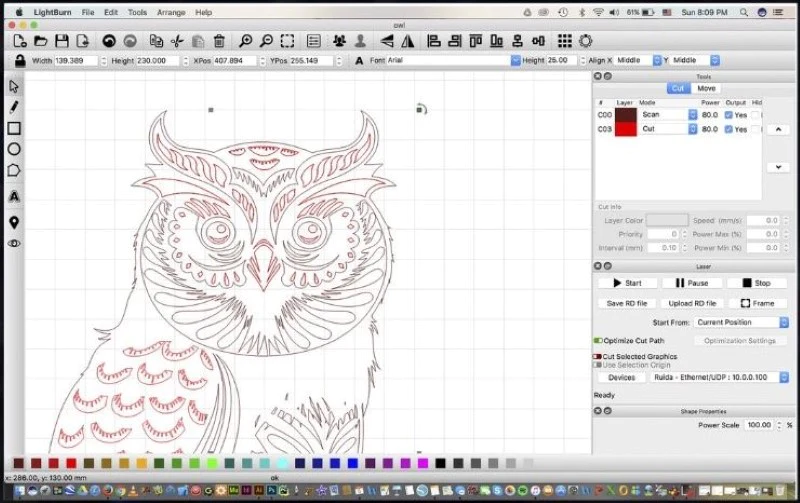
LightBurn is the industry-standard laser engraver software thanks to its unmatched power and user-friendly tools.
Key Features
Works with almost every laser machine
Vector & raster editing
Camera alignment system
Shape library
Multi-device support
LaserGRBL
A top choice for beginners and hobbyists using diode lasers.
Key Features
Free to use
Easy interface
Raster-to-vector conversion
Supports G-code machines
RDWorks
RDWorks is designed specifically for Ruida controller laser machines.
Key Features
Perfect for CO₂ lasers
Includes path optimization
Offers material presets
EZCAD
Mostly used for fiber laser engraving and metal marking.
Key Features
Ideal for industrial users
Deep control of galvo systems
Fast processing speed
Tool Creative Space (XCS)
Built for xTool machines, this laser engraver software is great for beginners and creators.
Key Features
Clean design
Smart object detection
Material presets
Easy 3D object manipulation
Benefits of Using Advanced Laser Engraver Software
Higher Productivity
Automation features reduce manual work and speed up engraving tasks.
Improved Precision
Better control of power, speed, and beam direction ensures professional-quality results.
Greater Creativity
The ability to design custom artwork, patterns, and effects expands your creative limits.
Reduced Material Waste
Preview tools help avoid costly mistakes.
Better File Compatibility
Import or export:
SVG
PNG
JPG
DXF
PDF
AI
How to Choose the Best Laser Engraver Software
Choosing the right laser engraver software depends on your workload, budget, and the type of laser you use.
Check Machine Compatibility
Ensure your software supports your:
Brand
Controller (Ruida, GRBL, DSP, etc.)
Laser type
Determine Your Skill Level
Beginners may prefer:
xTool Creative Space
LaserGRBL
Professionals may choose:
LightBurn
EZCAD
Consider Features
Look for:
Layer support
Image editing
Vector tools
Real-time preview
G-code optimization
Budget
Some programs are free, while professional tools require licensing.
Common Challenges with Laser Engraver Software
Software–Machine Incompatibility
Not all programs support every laser machine.
Learning Curve
Advanced laser engraver software may require training.
File Import Errors
Poorly formatted files can cause failed engravings.
Incorrect Material Settings
Using wrong power/speed levels can burn or damage materials.
Tips for Using Laser Engraver Software Efficiently
Use High-Quality Vector Files
This prevents jagged edges during cutting.
Pre-Test Material Settings
Every material reacts differently to laser intensity.
Keep the Software Updated
Updates often include performance improvements.
Use Layer Naming
This makes complex projects easier to manage.
Frequently Asked Questions (FAQs)
What is laser engraver software?
It is software used to design, control, and manage engraving or cutting jobs on laser machines.
Which laser engraver software is best for beginners?
LaserGRBL and xTool Creative Space are excellent beginner-friendly options.
Can I use free laser engraver software?
Yes—LaserGRBL and Inkscape are powerful free tools for designing and engraving.
Does LightBurn work with all laser engravers?
LightBurn supports many laser brands but not all. Compatibility depends on the controller type.
Do I need separate software for design and engraving?
Some all-in-one tools include both features, while others require design programs like Illustrator or CorelDRAW.