





What Is Fan Control Software?
Fan control software is a specialized utility that allows users to monitor and adjust the speed of their PC’s cooling fans. Instead of relying solely on default BIOS settings, this software gives you real-time control over how your system manages heat, noise, and airflow.
Definition and Core Functionality
At its core, fan control software lets you regulate CPU fans, case fans, and sometimes GPU fans based on temperature readings. It connects to onboard sensors and fan headers on the motherboard, allowing you to fine-tune fan behavior. This level of control is especially useful for gaming PCs, workstations, and silent PC builds where cooling needs can vary significantly.
How Fan Control Software Works
Fan control software reads temperature data from sensors on the CPU, GPU, and motherboard. Based on predefined rules or custom fan curves, it adjusts fan speeds dynamically. For example, fans can run quietly at low temperatures and ramp up automatically when the system is under heavy load, ensuring efficient cooling without unnecessary noise.
Why Fan Control Software Matters for PC Cooling
Modern PCs generate a lot of heat, and improper cooling can lead to serious performance and reliability issues. Fan control software helps strike the right balance between cooling efficiency and noise control.
Preventing Overheating and Thermal Throttling
Without proper fan management, components like CPUs and GPUs can overheat, triggering thermal throttling. This reduces performance to protect hardware. Fan control software ensures that cooling fans respond quickly to rising temperatures, keeping components within safe operating limits.
Reducing Fan Noise and Improving Comfort
Default fan settings often prioritize aggressive cooling, leading to loud and constant fan noise. With fan control software, users can lower fan speeds during light tasks such as browsing or office work, creating a quieter and more comfortable computing environment.
Enhancing Performance and Hardware Lifespan
By maintaining stable temperatures, fan control software helps components run at optimal performance levels. Consistent cooling also reduces long-term wear and tear, potentially extending the lifespan of your CPU, GPU, and other critical hardware.
Key Features to Look for in Fan Control Software
Not all fan control tools are created equal. Choosing the right one depends on the features it offers and how well it integrates with your system.
Real-Time Temperature and Sensor Monitoring
A good fan control software should display real-time temperature readings from multiple sensors. This visibility allows users to understand how their system behaves under different workloads and make informed cooling adjustments.
Custom Fan Curves and Speed Profiles
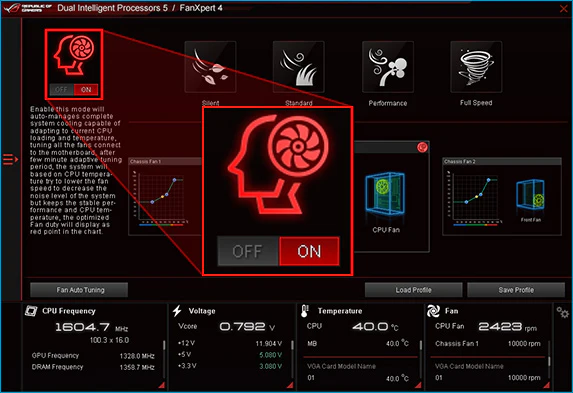
Custom fan curves let you define how fan speeds change at specific temperature thresholds. Some software also supports multiple profiles, such as silent, balanced, or performance modes, making it easy to switch cooling behavior depending on usage.
Automatic vs Manual Fan Control
Automatic fan control is ideal for beginners, as the software adjusts fan speeds dynamically. Advanced users may prefer manual control, which allows precise tuning of fan behavior for overclocking or specialized cooling setups.
User Interface and Ease of Configuration
An intuitive user interface makes fan control software easier to use, especially for newcomers. Clear graphs, sliders, and visual feedback simplify the process of creating and adjusting fan curves.
Types of Fan Control Software
Fan control solutions generally fall into three main categories, each with its own advantages and limitations.
BIOS-Based Fan Control
BIOS fan control is built into the motherboard firmware and works independently of the operating system. While it’s reliable and simple, it often lacks advanced customization options and real-time flexibility compared to software-based solutions.
Motherboard Manufacturer Utilities
Many motherboard brands offer their own fan control utilities, such as ASUS, MSI, or Gigabyte software. These tools integrate well with specific hardware but may consume more system resources or conflict with other monitoring applications.
Third-Party Fan Control Software
Third-party fan control software is often more flexible and feature-rich. These tools typically support multiple brands and offer advanced customization, making them popular among enthusiasts and power users.
Best Fan Control Software for PC Users
Choosing the best fan control software depends on your budget, experience level, and hardware setup.
Best Free Fan Control Software
Free fan control software options are widely available and often sufficient for most users. They usually support custom fan curves, temperature monitoring, and basic automation without any cost.
Best Paid and Premium Options
Paid fan control software may offer advanced features such as enhanced sensor support, priority updates, and professional-grade interfaces. These options are ideal for users who want maximum control and reliability.
Fan Control Software for Laptops
Laptop fan control software is more limited due to hardware restrictions. Some laptops allow basic fan adjustments, but users should proceed carefully to avoid overheating or voiding warranties.
Fan Control Software Compatibility
Before installing fan control software, it’s important to ensure compatibility with your operating system and hardware.
Windows Fan Control Software
Most fan control software is designed for Windows, particularly Windows 10 and Windows 11. These platforms offer the widest range of supported tools and hardware integration.
Linux and macOS Support
Linux users can find open-source fan control utilities, though setup may be more technical. macOS support is limited due to Apple’s hardware restrictions, especially on newer systems.
Motherboard and Hardware Compatibility
Fan control software relies heavily on motherboard fan headers and sensor support. Always check compatibility with your specific motherboard model, CPU cooler, and case fans to ensure proper functionality.
How to Set Up Fan Control Software Properly
Setting up fan control software correctly is essential for maintaining safe temperatures, reducing noise, and ensuring system stability. A proper setup prevents overheating while allowing your PC to adapt to different workloads efficiently.
Installation and Initial Setup
Start by downloading fan control software that is compatible with your motherboard and operating system. After installation, allow the software to detect all available fans and temperature sensors. It’s recommended to disable overlapping fan control tools, including manufacturer utilities, to avoid conflicts. Once detected, verify that each fan responds correctly to manual speed adjustments before moving on to advanced configuration.
Creating Safe and Effective Fan Curves
Fan curves define how fan speed changes based on temperature. A safe fan curve gradually increases fan speed as temperatures rise, avoiding sudden spikes. For most systems, keeping fans at lower speeds under light loads and ramping them up aggressively beyond higher temperature thresholds offers the best balance between cooling and noise. Always ensure minimum fan speeds are high enough to maintain consistent airflow.
Testing, Monitoring, and Optimization
After setting fan curves, stress-test your system using demanding applications or benchmarks. Monitor temperatures closely to ensure they remain within safe limits. Adjust fan curves as needed based on real-world performance. Regular monitoring helps fine-tune cooling efficiency and ensures your fan control software performs reliably over time.
Fan Control Software for Different Use Cases
Different PC setups have unique cooling requirements. Fan control software allows you to customize cooling behavior for specific use cases.
Gaming PCs and High-Performance Builds
Gaming PCs generate significant heat during extended play sessions. Fan control software helps maintain optimal temperatures by increasing airflow during high CPU and GPU usage. Performance-focused fan profiles prevent thermal throttling, ensuring consistent frame rates and stable system performance during intense gaming sessions.
Silent PCs and Home Office Systems
For home offices and media PCs, noise reduction is often a priority. Fan control software allows users to create quiet fan profiles that prioritize low noise during everyday tasks. Fans only ramp up when temperatures rise, maintaining a peaceful working environment without sacrificing safety.
Workstations and Professional Use
Professional workstations often run demanding workloads for long periods. Fan control software ensures reliable cooling during tasks such as video rendering, 3D modeling, and data processing. Stable temperature management improves system reliability and helps avoid downtime caused by overheating.
Fan Control Software Safety and Best Practices
While fan control software is generally safe, following best practices is essential to avoid potential issues.
Recommended Temperature Thresholds
Safe temperature thresholds vary by component, but CPUs typically perform best below 85°C under load, while GPUs should remain under 80–85°C. Fan curves should be designed to increase airflow before temperatures approach these limits. Monitoring temperatures regularly helps maintain safe operating conditions.
Avoiding Fan Conflicts and Software Issues
Running multiple fan control or monitoring tools simultaneously can cause conflicts. To avoid issues, use only one fan control software at a time and disable duplicate fan control features in the BIOS or other utilities. Keeping your software updated also helps prevent compatibility problems.
When to Use Default BIOS Settings
In some cases, default BIOS fan settings are sufficient, especially for basic systems or users who prefer a hands-off approach. If you encounter persistent software issues or incompatibility, reverting to BIOS fan control provides a stable and reliable fallback option.
Fan Control Software vs BIOS Fan Settings
Both fan control software and BIOS fan settings offer ways to manage cooling, but each has its own strengths.
Pros and Cons of Software-Based Control
Fan control software provides real-time monitoring, advanced customization, and profile switching. However, it relies on the operating system and may introduce conflicts if not configured properly. It’s ideal for users who want precise control and flexibility.
Pros and Cons of BIOS Fan Control
BIOS fan control operates independently of the OS and is generally very stable. The downside is limited customization and less dynamic response to changing workloads. BIOS control is best suited for users who prioritize simplicity and reliability.
Choosing the Right Approach
The right approach depends on your needs. Enthusiasts and gamers benefit most from fan control software, while casual users may prefer BIOS-based fan control. Some users combine both, using BIOS settings as a baseline and software for fine-tuning.
Common Fan Control Software Problems and Fixes
Even reliable fan control software can occasionally run into issues. Understanding common problems helps resolve them quickly.
Fan Control Not Working or Not Detected
If fans are not detected, ensure they are connected to motherboard fan headers rather than directly to the power supply. Updating motherboard drivers and firmware can also improve detection.
Software Conflicts and Startup Errors
Startup errors often occur when multiple monitoring tools compete for sensor access. Disable unnecessary background utilities and set your fan control software to launch after system startup to reduce conflicts.
Inaccurate Temperature Readings
Inaccurate readings may result from unsupported sensors or outdated software versions. Updating the software and verifying sensor selection can improve accuracy.
Is Fan Control Software Worth Using?
Fan control software offers clear benefits, but it’s not essential for everyone.
Who Should Use Fan Control Software
Users with gaming PCs, custom builds, or noise-sensitive environments benefit the most from fan control software. It’s also valuable for professionals who rely on consistent system performance.
Beginners vs Advanced Users
Beginners may find automatic fan control modes sufficient, while advanced users can take advantage of manual fan curves and detailed monitoring. Most modern tools cater to both experience levels.
Frequently Asked Questions About Fan Control Software
Is Fan Control Software Safe?
Yes, when configured properly, fan control software is safe and helps protect your hardware by maintaining optimal temperatures.
Can Fan Control Software Damage PC Components?
Improper settings could cause overheating, but most software includes safeguards. Following recommended temperature thresholds minimizes risk.
Does Fan Control Software Improve Gaming Performance?
Indirectly, yes. By preventing thermal throttling, fan control software helps maintain stable performance and smoother gameplay.