






Modern businesses rely on secure and compliant payment systems, and EMV card reader Windows software plays a critical role in enabling safe card transactions on Windows-based systems. Whether you run a retail store, restaurant, or enterprise POS environment, understanding how this software works and how to choose the right solution is essential.
What Is EMV Card Reader Windows Software?
EMV card reader Windows software is an application or driver-based system that allows EMV-enabled card readers to communicate with Windows computers. It ensures secure processing of chip-based, PIN, and contactless transactions while meeting global payment compliance standards.
Overview of EMV Payment Technology
EMV stands for Europay, Mastercard, and Visa—organizations that established the global standard for chip-based payment cards. Unlike magnetic stripe cards, EMV cards generate a unique transaction code for each payment, significantly reducing fraud and card cloning. EMV technology is now the global standard for secure in-person payments.
How EMV Card Reader Software Works on Windows
On Windows systems, EMV software acts as a bridge between the card reader hardware and the payment application. It manages device communication, encrypts sensitive data, processes transactions, and sends information securely to payment gateways or POS systems. Without proper Windows-compatible EMV software, card readers cannot function correctly.
EMV Hardware vs Windows Software
EMV hardware refers to the physical card reader device, while Windows software handles transaction logic, compliance, and integration. Hardware reads the card, but the software validates the transaction, ensures security protocols, and communicates with banking networks.
Key Features of EMV Card Reader Software for Windows
Choosing the right EMV card reader Windows software requires understanding its core features.
EMV Level 1 and Level 2 Certification
Level 1 certification ensures the card reader hardware meets EMV electrical and physical standards, while Level 2 certification validates transaction processing logic. Reliable Windows EMV software supports both levels to ensure compatibility with global payment networks.
PCI DSS Compliance and Data Security
Security is critical in payment processing. EMV software for Windows must comply with PCI DSS standards, offering encryption, secure key management, and protection against data breaches. This compliance helps businesses avoid penalties and protect customer data.
Support for Chip, PIN, and Contactless Payments
Modern EMV card reader Windows software supports multiple payment methods, including chip-and-PIN, chip-and-signature, NFC contactless payments, and mobile wallets like Apple Pay and Google Pay.
Transaction Processing and Reporting Tools
Advanced EMV software includes transaction logs, real-time reporting, refund management, and reconciliation tools. These features help businesses track sales, manage disputes, and improve financial transparency.
POS and Third-Party Software Integration
Integration is essential for seamless operations. Most EMV card reader Windows software solutions provide APIs or SDKs to integrate with POS systems, accounting software, ERP platforms, and inventory management tools.
System Requirements and Compatibility
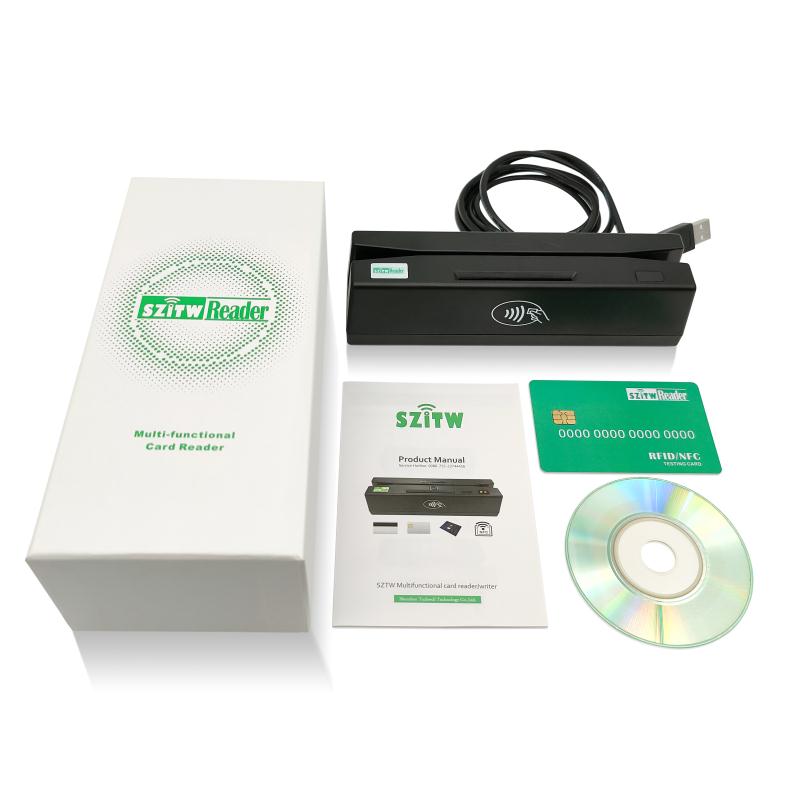
Before installation, businesses must ensure their systems meet compatibility requirements.
Supported Windows Versions
Most EMV card reader software supports Windows 10, Windows 11, and Windows Server editions. Older versions may lack security updates and driver support, making them unsuitable for EMV transactions.
Compatible EMV Card Reader Devices
Windows EMV software typically supports USB, serial, or Bluetooth card readers from major manufacturers. Compatibility depends on firmware versions and certification status, so checking vendor documentation is essential.
Driver and Firmware Requirements
Proper drivers and up-to-date firmware are necessary for stable performance. Manufacturers regularly release updates to improve security, fix bugs, and maintain compliance with payment networks.
How to Set Up EMV Card Reader Software on Windows
Setting up EMV card reader Windows software is straightforward when following best practices.
Installing EMV Card Reader Drivers
Start by downloading drivers from the manufacturer or trusted provider. Install them before connecting the card reader to ensure Windows recognizes the device correctly.
Configuring EMV Payment Settings
After installation, configure transaction settings such as currency, region, payment methods, and communication protocols. These settings ensure smooth processing and compliance with local regulations.
Testing Transactions and Validation
Perform test transactions using sample cards or sandbox environments. This step verifies that the EMV card reader Windows software processes payments correctly and communicates with the payment gateway.
Troubleshooting Installation Issues
Common issues include driver conflicts, incorrect COM port settings, or outdated firmware. Reinstalling drivers, updating Windows, or adjusting permissions usually resolves these problems.
Best EMV Card Reader Windows Software Solutions
There are several types of EMV card reader software available for Windows users.
Manufacturer-Provided EMV Software
Many hardware manufacturers offer proprietary Windows software tailored to their devices. These solutions offer optimal compatibility but may lack flexibility or advanced features.
Third-Party EMV Payment Applications
Third-party EMV card reader Windows software often provides broader integrations, cloud connectivity, and advanced reporting tools. These solutions are ideal for businesses using custom POS systems.
Free vs Paid EMV Card Reader Software
Free software may work for basic transactions, but paid solutions offer better security, support, compliance updates, and scalability. Growing businesses usually benefit from premium options.
Comparison of Top EMV Software Tools
When comparing solutions, consider certification status, security features, supported devices, integration capabilities, pricing, and customer support. The best EMV card reader Windows software balances compliance, usability, and performance.
EMV Card Reader Windows Software: Security, Benefits, and Future Trends
As digital payments continue to grow, businesses must rely on EMV card reader Windows software to ensure secure, compliant, and efficient transactions. From fraud prevention to system scalability, the right EMV software plays a vital role in modern payment environments. This article explores security considerations, common challenges, benefits, use cases, and emerging trends in EMV technology for Windows systems.
Security and Compliance Considerations
Security and compliance are the foundation of any EMV-enabled payment system. EMV card reader Windows software is designed to protect sensitive data while meeting strict regulatory requirements.
Preventing Fraud with EMV Technology
EMV technology significantly reduces card-present fraud by generating a unique cryptographic code for every transaction. Unlike magnetic stripe payments, EMV transactions cannot be reused or duplicated, making them far more secure. Windows-based EMV software ensures these dynamic authentication processes are executed correctly during each payment.
Encryption and Tokenization
Modern EMV card reader Windows software uses end-to-end encryption to protect cardholder data during transmission. Tokenization further enhances security by replacing sensitive information with non-sensitive tokens, reducing the risk of data exposure even in the event of a breach.
Maintaining Ongoing Compliance
Payment regulations evolve constantly. Reliable EMV software for Windows provides regular updates to maintain compliance with PCI DSS, EMV Level 1 and Level 2 standards, and regional payment regulations. Ongoing compliance protects businesses from penalties and operational disruptions.
Common Problems with EMV Card Reader Software on Windows
While EMV systems are reliable, businesses may occasionally encounter technical challenges.
Connection and Driver Errors
Connection issues often stem from outdated drivers, incorrect USB or serial port settings, or operating system updates. Ensuring that drivers are up to date and compatible with the Windows version in use can resolve most connectivity problems.
EMV Transaction Failures
Transaction failures may occur due to configuration errors, network instability, or certification mismatches. Proper testing, stable internet connectivity, and validated EMV software help minimize declined or interrupted transactions.
Software Compatibility Issues
Not all EMV card reader Windows software is compatible with every POS system or device. Compatibility issues can arise when using older hardware, unsupported Windows versions, or third-party applications without proper integration support.
Benefits of Using EMV Card Reader Software on Windows
Implementing EMV card reader Windows software provides several advantages for businesses of all sizes.
Enhanced Payment Security
The primary benefit of EMV software is improved security. Chip-based transactions, encryption, and compliance standards significantly reduce fraud risks and protect customer data.
Faster Checkout and Customer Trust
Efficient EMV processing speeds up checkout times and improves the customer experience. Secure payment methods also build trust, encouraging repeat business and positive brand perception.
Scalability for Growing Businesses
Windows-based EMV software is highly scalable, allowing businesses to add new devices, payment methods, or integrations as they grow. This flexibility makes it suitable for both startups and expanding enterprises.
EMV Card Reader Software for Different Business Types
Different industries have unique payment needs, and EMV software adapts to various business environments.
Small Businesses and Retail Stores
For small businesses, EMV card reader Windows software offers an affordable and secure way to accept card payments. Simple setup, user-friendly interfaces, and basic reporting tools make it ideal for retail and service-based businesses.
Enterprises and High-Volume Merchants
Large enterprises require advanced features such as centralized reporting, multi-location support, and deep POS integrations. Enterprise-grade EMV software ensures reliability, performance, and compliance at scale.
E-commerce and Omnichannel Use Cases
While EMV is traditionally associated with in-person payments, many Windows-based EMV solutions support omnichannel strategies. Integration with e-commerce platforms and unified payment systems enables consistent customer experiences across online and offline channels.
Future Trends in EMV Card Reader Software
EMV technology continues to evolve alongside digital payment innovations.
Contactless and Mobile Payments
Contactless EMV payments and mobile wallets are becoming the standard. EMV card reader Windows software is increasingly optimized for NFC transactions, supporting faster, touch-free payments.
Cloud-Based EMV Solutions
Cloud-based EMV software offers centralized management, automatic updates, and real-time analytics. These solutions reduce maintenance overhead and improve system reliability for Windows users.
AI and Advanced Fraud Detection
Artificial intelligence is playing a growing role in payment security. Future EMV card reader Windows software will leverage AI-driven analytics to detect unusual transaction patterns and prevent fraud in real time.
FAQs About EMV Card Reader Windows Software
Is EMV card reader software required for Windows POS systems?
Yes, EMV card reader Windows software is essential for processing chip-based transactions and ensuring compliance with payment standards.
Does EMV software work with Windows 11?
Most modern EMV software solutions fully support Windows 11, provided drivers and firmware are up to date.
How do I choose the best EMV card reader software?
Look for certified software that offers strong security, device compatibility, POS integration, and reliable support.
Can EMV software integrate with existing POS systems?
Yes, many EMV card reader Windows software solutions provide APIs and SDKs for seamless integration with existing POS platforms.
Conclusion
EMV card reader Windows software is a critical component of secure and efficient payment processing. By addressing security, compliance, usability, and future trends, businesses can select a solution that meets current needs while preparing for tomorrow’s payment technologies. Investing in reliable EMV software ensures safer transactions, better customer experiences, and long-term business growth.