






Understanding Chevy Silverado GMC Sierra Software Updates
Modern Chevy Silverado and GMC Sierra trucks rely heavily on advanced software to control everything from infotainment to safety systems. A Chevy Silverado GMC Sierra software update ensures these systems stay optimized, secure, and compatible with the latest features.
What a Vehicle Software Update Is
A vehicle software update is a digital upgrade released by General Motors to improve, fix, or enhance a truck’s onboard systems. Unlike mechanical recalls, software updates adjust how electronic components behave, improving performance without replacing hardware. These updates may include bug fixes, security patches, and feature enhancements.
Systems Affected by Software Updates
A Chevy Silverado GMC Sierra software update can affect multiple vehicle systems, including the infotainment unit, engine control module (ECM), transmission control, safety sensors, cameras, and driver assistance technologies. Because these trucks share GM’s advanced electrical architecture, updates often improve multiple systems at once.
Difference Between OTA and Dealer Updates
Over-the-air (OTA) updates are downloaded wirelessly through the vehicle’s internet connection, while dealer updates require a visit to a GM service center. OTA updates are more convenient, but some critical or complex updates still require dealer installation using diagnostic equipment.
Latest Chevy Silverado GMC Sierra Software Update Overview
GM regularly releases updates to enhance the driving experience, improve reliability, and address reported issues.
Infotainment System Improvements
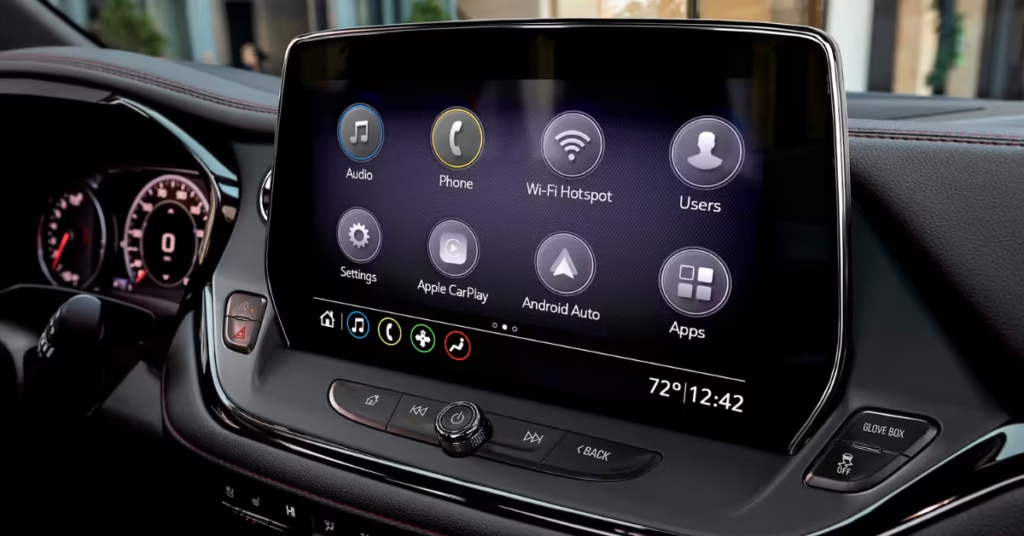
Recent Chevy Silverado GMC Sierra software updates often focus on infotainment performance. Improvements include faster touchscreen response, smoother menu navigation, enhanced voice commands, and improved Apple CarPlay and Android Auto stability. Some updates also fix Bluetooth connectivity and random system reboots.
Safety and Driver Assistance Enhancements
Software updates frequently improve safety technologies such as adaptive cruise control, lane keep assist, forward collision alerts, and parking assist. These enhancements help sensors and cameras respond more accurately, reducing false warnings and improving real-world driving confidence.
Performance and Powertrain Updates
Performance-related updates optimize engine behavior, transmission shifting, and fuel efficiency. ECM and transmission software updates can deliver smoother acceleration, improved towing performance, and reduced drivetrain lag, especially under heavy loads.
How to Check for Chevy Silverado GMC Sierra Software Updates
Knowing how to check for updates ensures you don’t miss important improvements.
Checking Updates Through the Infotainment System
Most newer Silverado and Sierra models allow owners to check updates directly from the infotainment screen. Navigate to the settings menu, locate the software or system update section, and check for available downloads. The vehicle must be connected to Wi-Fi or cellular data.
Using the MyChevrolet or MyGMC Mobile App
The MyChevrolet and MyGMC apps provide update notifications, vehicle status alerts, and installation reminders. Once your VIN is linked, the app will notify you when a Chevy Silverado GMC Sierra software update becomes available and guide you through the process.
Checking Updates at a Dealership
If you’re unsure whether your truck is eligible for updates, a GM dealership can scan your vehicle for available software revisions. Dealers also check for technical service bulletins (TSBs) that may not be available via OTA updates.
How to Install a Chevy Silverado GMC Sierra Software Update
Installation methods depend on the update type and vehicle compatibility.
Over-the-Air (OTA) Software Update Process
OTA updates typically download in the background while the vehicle is parked. Once downloaded, the system prompts you to schedule installation. During installation, the vehicle must remain parked with sufficient battery charge, and the process may take 20 to 60 minutes.
Dealer-Installed Software Updates
Dealer-installed updates involve connecting the truck to GM diagnostic tools. These updates may take longer but ensure proper calibration of critical systems. Most dealer updates are free if covered under warranty or related to recalls.
Installation Time and Requirements
Installation time varies by update size and system complexity. Owners should ensure the vehicle has a strong internet connection, adequate battery power, and is parked in a safe location before beginning any update.
Common Chevy Silverado GMC Sierra Software Update Problems
While updates usually install smoothly, issues can occur.
Software Update Failed or Not Downloading
Failed downloads often result from poor internet connectivity or interrupted installation. Restarting the vehicle, reconnecting to Wi-Fi, or retrying later usually resolves the issue. Persistent failures may require dealer assistance.
Infotainment Screen Freezing After Update
Some users report temporary infotainment freezing or lag after a software update. A system reboot or factory reset often fixes the problem. In rare cases, GM releases follow-up patches to address post-update bugs.
Error Messages and Warning Lights
Warning lights or error messages after an update may indicate calibration issues. If these persist after driving a short distance, a dealership diagnostic check is recommended.
Chevy Silverado vs GMC Sierra Software Updates
Although closely related, Silverado and Sierra software experiences can differ slightly.
Shared GM Software Platform
Both trucks run on GM’s shared software architecture, meaning core updates apply to both models. This ensures consistent performance, safety, and security across brands.
Feature Differences by Trim Level
Higher trims like the Silverado High Country or GMC Sierra Denali may receive additional features due to upgraded hardware. Software updates unlock trim-specific capabilities based on installed equipment.
Brand-Specific Software Customizations
While functionality is similar, GMC Sierra software often features a more premium interface design, while Chevy Silverado software emphasizes practicality. These differences are largely visual rather than functional.
Keeping your Chevy Silverado GMC Sierra software update current ensures optimal performance, enhanced safety, and access to the latest features. Regularly checking for updates through the infotainment system, mobile apps, or dealership helps keep your truck running at its best.
Supported Model Years for Chevy Silverado GMC Sierra Software Updates
Not all Chevy Silverado and GMC Sierra trucks receive software updates in the same way. Update availability largely depends on the model year, onboard technology, and hardware configuration.
Software Updates for Newer Models
Newer Chevy Silverado and GMC Sierra models—typically from 2019 and newer—benefit the most from software updates. These trucks are built on GM’s modern electrical architecture, enabling frequent over-the-air (OTA) updates. Owners of recent models can receive updates for infotainment systems, driver assistance features, performance optimization, and security enhancements without visiting a dealership.
Trucks equipped with advanced infotainment systems and built-in connectivity are more likely to receive regular Chevy Silverado GMC Sierra software updates. As GM continues expanding OTA capabilities, newer models remain the primary focus for feature upgrades and system improvements.
Limitations for Older Model Years
Older Chevy Silverado and GMC Sierra models may face limitations when it comes to software updates. Trucks built before GM’s latest digital platform often require dealer-installed updates instead of OTA delivery. In some cases, older hardware may not support newer features at all.
While GM still releases critical bug fixes and safety-related updates for older models, feature expansions and interface upgrades are usually reserved for newer vehicles. This makes it important for owners of older trucks to periodically check with a dealership for available updates.
Hardware Compatibility Requirements
Hardware plays a critical role in determining update eligibility. Features like advanced driver assistance, high-resolution displays, and connectivity modules must already be installed to support certain updates. A Chevy Silverado GMC Sierra software update cannot add features that require physical components the truck does not have.
For example, updates that enhance camera systems or adaptive cruise control depend on compatible sensors and processors. Understanding your truck’s trim level and factory-installed hardware helps set realistic expectations.
Benefits of Keeping Your Chevy Silverado GMC Sierra Software Updated
Staying current with software updates delivers tangible benefits that go beyond convenience.
Improved Vehicle Performance and Stability
Software updates often fine-tune engine management, transmission behavior, and overall system communication. These improvements result in smoother shifting, better throttle response, and increased stability under heavy towing or hauling conditions.
A properly updated system also reduces the likelihood of glitches, freezes, or unexpected behavior, ensuring a more reliable driving experience.
Enhanced Safety and Security
One of the most important benefits of a Chevy Silverado GMC Sierra software update is improved safety. Updates help refine driver assistance features like lane keeping assist, collision warnings, and adaptive cruise control. These improvements allow sensors and cameras to operate more accurately in real-world conditions.
Security updates also protect against software vulnerabilities, ensuring the vehicle’s connected systems remain protected from unauthorized access.
Access to New Features and Fixes
Software updates often introduce new features or unlock previously unavailable functionality. These may include enhanced infotainment options, improved voice recognition, or better smartphone integration. Updates also resolve known bugs, such as Bluetooth connection issues or touchscreen lag, improving daily usability.
Keeping software current ensures owners benefit from GM’s ongoing development without purchasing new hardware.
Frequently Asked Questions About Chevy Silverado GMC Sierra Software Updates
How Often Are Software Updates Released?
GM releases software updates periodically throughout the year. The frequency varies based on vehicle model, system type, and reported issues. Some updates focus on minor bug fixes, while others deliver larger feature enhancements.
Are Software Updates Free?
Most Chevy Silverado GMC Sierra software updates are free, especially those related to safety, security, or warranty-covered systems. Dealer-installed updates may involve a fee if they fall outside warranty coverage, but OTA updates are typically included at no cost.
Can You Drive During a Software Update?
In most cases, no. OTA updates require the vehicle to remain parked with the engine off during installation. Driving during an update can interrupt the process and potentially cause errors. The system usually notifies drivers when it is safe to operate the vehicle again.
What Happens If You Skip an Update?
Skipping a Chevy Silverado GMC Sierra software update may result in missed improvements, unresolved bugs, or reduced system performance. While skipping an update usually does not cause immediate problems, it may prevent future updates from installing correctly.
Do Updates Affect Vehicle Warranty?
Software updates do not negatively affect vehicle warranty. In fact, installing recommended updates helps maintain compliance with GM service standards and ensures systems function as intended under warranty coverage.
Final Thoughts on Chevy Silverado GMC Sierra Software Updates
Staying informed and proactive about software updates is essential for modern truck ownership.
Best Practices for Staying Up to Date
Owners should regularly check their infotainment system and mobile apps for available updates. Keeping the vehicle connected to Wi-Fi and maintaining a healthy battery ensures smooth installations. Scheduling dealer visits for older models also helps avoid missed updates.
When to Contact GM Support or a Dealer
If an update fails, causes warning messages, or leads to system malfunctions, contacting GM support or visiting a dealership is recommended. Professional diagnostics ensure updates are applied correctly and systems are calibrated properly.
Keeping your Chevy Silverado GMC Sierra software update current ensures better performance, improved safety, and access to the latest features—helping your truck stay reliable, modern, and road-ready for years to come.